
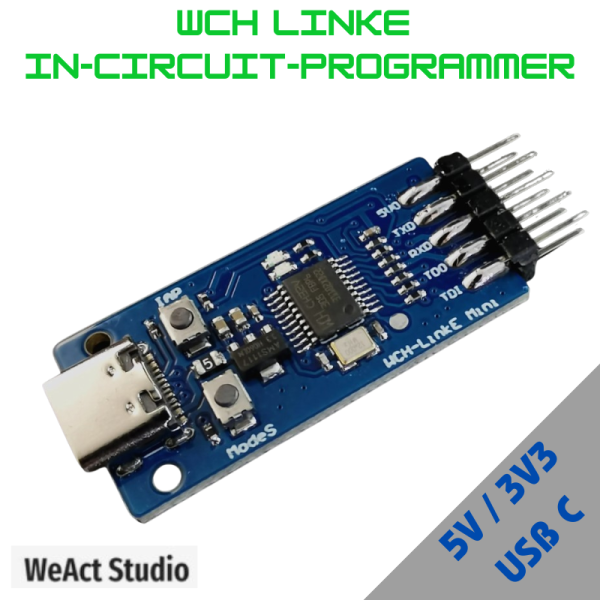

Support online downloading and debugging of WCH RISC‐V architecture MCU and ARM chips with SWD interface,with two‐wire interface,fast speed and stable operation.
Key Features:
- Support 3.3/5V dual power output.
- Red and blue LED indicators for easy viewing of working status.
- Directly marked on the interface definition board for ease of use.
- Support for automatic firmware detection and upgrade.
- Support for one‐button switching of RISC‐V/ARM mode by the host computer.
- Optional: Use the transparent case to protect the motherboard,easy to carry.
Function:
WCH‐LinkE module,can be used for online downloading and debugging of WCH RISC‐V architecture MCU and ARM chips with SWD interface. It is connected to the host computer via USB2.0 full-speed interface for plug‐and‐play driver‐free installation and connected to the target chip by SWD interface for debugging and programming. Also with 1 way serial port for easy debugging output.
Hardware description:
Pin Definition

If WCH-LinkE firmware needs to be updated:
- Online update,MounRiver Studio/WCH-LinkUtility will have a pop-up reminder when you click download,click Yes to start the update.
- Manual online update,press and hold the IAP key,power on until the blue LED is lit,click download,MounRiver Studio/WCH-LinkUtility will have a pop-up reminder,click Yes to start the update.
- Instructions for use
SWD connection method:

Technical resources:
- MounRiver Studio access website: http://mounriver.com/
- WCH-LinkUtility access website:https://www.wch.cn/downloads/WCH-LinkUtility_ZIP.html
- WCHISPTool access website: https://www.wch.cn/downloads/WCHISPTool_Setup_exe.html
- WCH-Link information website: https://www.wch.cn/products/WCH-Link.html


Reviews
There are no reviews yet.